> ## Documentation Index
> Fetch the complete documentation index at: https://help.heydenada.com/llms.txt
> Use this file to discover all available pages before exploring further.
# Fonts
> Host your brand's web fonts at permanent URLs for use in your libraries
Email clients and landing pages can only display a custom typeface if the font file is hosted somewhere reliable. The **Fonts** area gives your brand's font files a permanent home on Denada's CDN, so your libraries can reference web fonts at URLs that will never move or expire — instead of depending on a third-party host that might change out from under your emails.
Click **Fonts** in the sidebar to open it.
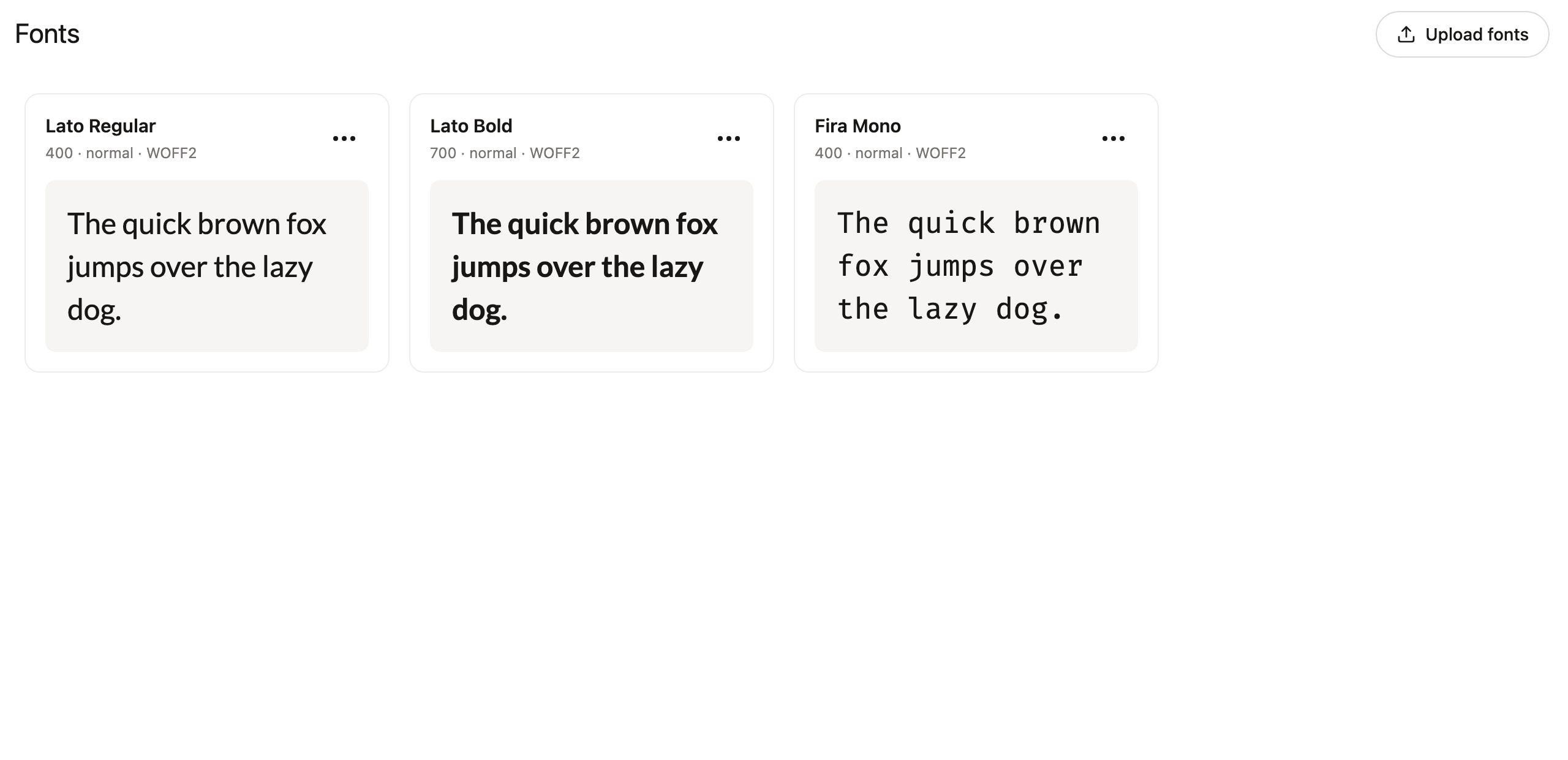 The Fonts section appears in the sidebar for members with the **Libraries** permission, since hosted fonts are used when building libraries. Team owners can grant the permission in [team settings](/team/team-management).
## Upload fonts
Drag font files anywhere onto the page, or click **Upload fonts** to browse. Denada accepts **WOFF2**, **WOFF**, **TTF**, and **OTF** files, and reads the family, weight, and style from the filename — upload `Lato-Bold.woff2` and it arrives as Lato at weight 700.
Each hosted font gets a card with a live preview, so you can confirm at a glance that the file renders the way you expect.
Prefer WOFF2 when you have a choice — it is the smallest format and the best supported by email clients and browsers that support web fonts at all.
Make sure your font license permits web embedding before hosting a font. Many desktop font licenses do not cover serving the file publicly.
## Use a hosted font in a library
Fonts are loaded in your library's [shell](/libraries/libraries-overview#the-shell) — the outer HTML document that wraps every block. Open the **⋯** menu on a font card and choose:
* **Copy @font-face CSS** — a ready-to-paste `@font-face` rule pointing at the hosted URL. Paste it into the shell's `` styles, then use the family name in your blocks.
* **Copy public URL** — just the permanent file URL, if you prefer to write the CSS yourself.
Because the URL is permanent, emails you have already sent keep rendering correctly forever — there is no font host to renew or migrate.
## Manage fonts
From each card's **⋯** menu you can also:
* **Rename** — give the font a friendlier name for organizing; this does not change the CSS font family.
* **Download** — retrieve the original file.
* **Delete font** — remove it from the Fonts page. Emails you have already sent may still reference the hosted URL, so deleting is about tidying the list rather than revoking the file.
## Fonts and AI agents
Connected [AI agents](/agents/overview) can work with hosted fonts too: the `list_fonts` tool returns each font's family, weight, and CDN URL ready for `@font-face` rules, and `create_font` hosts a new font from a download URL. This lets an agent building or restyling a library wire up your brand typography end to end. See [Agent capabilities](/agents/capabilities#fonts).
The Fonts section appears in the sidebar for members with the **Libraries** permission, since hosted fonts are used when building libraries. Team owners can grant the permission in [team settings](/team/team-management).
## Upload fonts
Drag font files anywhere onto the page, or click **Upload fonts** to browse. Denada accepts **WOFF2**, **WOFF**, **TTF**, and **OTF** files, and reads the family, weight, and style from the filename — upload `Lato-Bold.woff2` and it arrives as Lato at weight 700.
Each hosted font gets a card with a live preview, so you can confirm at a glance that the file renders the way you expect.
Prefer WOFF2 when you have a choice — it is the smallest format and the best supported by email clients and browsers that support web fonts at all.
Make sure your font license permits web embedding before hosting a font. Many desktop font licenses do not cover serving the file publicly.
## Use a hosted font in a library
Fonts are loaded in your library's [shell](/libraries/libraries-overview#the-shell) — the outer HTML document that wraps every block. Open the **⋯** menu on a font card and choose:
* **Copy @font-face CSS** — a ready-to-paste `@font-face` rule pointing at the hosted URL. Paste it into the shell's `` styles, then use the family name in your blocks.
* **Copy public URL** — just the permanent file URL, if you prefer to write the CSS yourself.
Because the URL is permanent, emails you have already sent keep rendering correctly forever — there is no font host to renew or migrate.
## Manage fonts
From each card's **⋯** menu you can also:
* **Rename** — give the font a friendlier name for organizing; this does not change the CSS font family.
* **Download** — retrieve the original file.
* **Delete font** — remove it from the Fonts page. Emails you have already sent may still reference the hosted URL, so deleting is about tidying the list rather than revoking the file.
## Fonts and AI agents
Connected [AI agents](/agents/overview) can work with hosted fonts too: the `list_fonts` tool returns each font's family, weight, and CDN URL ready for `@font-face` rules, and `create_font` hosts a new font from a download URL. This lets an agent building or restyling a library wire up your brand typography end to end. See [Agent capabilities](/agents/capabilities#fonts).