> ## Documentation Index
> Fetch the complete documentation index at: https://help.heydenada.com/llms.txt
> Use this file to discover all available pages before exploring further.
# Iterable
> Push finished emails from Denada to Iterable
Denada integrates with [Iterable](https://iterable.com) so you can design emails in Denada and push them directly to Iterable for sending. Exports land in Iterable's **Templates** section, ready to use in your campaigns.
## What you need
* A Denada project with an email ready to push
* An Iterable account with a **server-side API key** (found in your Iterable project under **Settings > API keys**)
You need a **server-side** API key, not a standard or mobile key. Denada uses this key to create and update email templates in your Iterable project.
## Connect Denada to Iterable
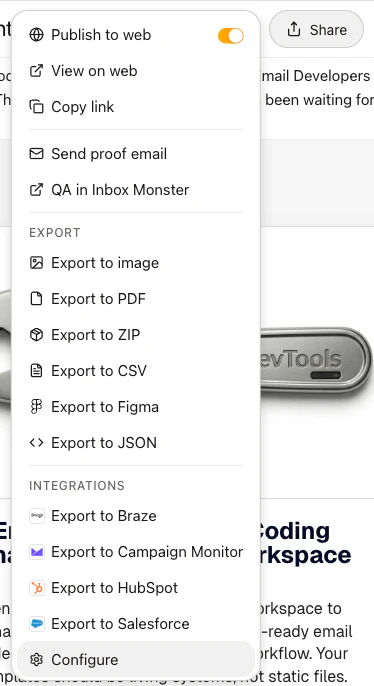
1. Open the **Share** menu on any project and scroll down to find the **Configure** option under **Integrations**. (You can also open your team's **Settings** page and click **Add integration** in the **Integrations** panel — manager access required.)
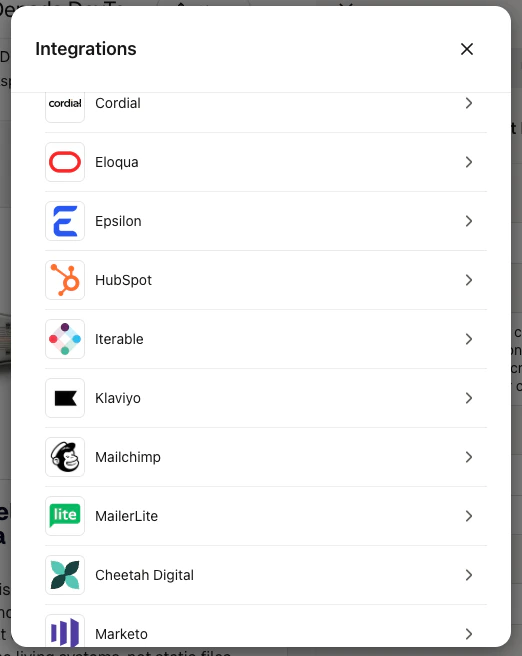
 2. In the **Integrations** dialog, select **Iterable**.
 3. Enter an optional **Name** for this configuration (useful if you have multiple Iterable projects) and your **API key**.
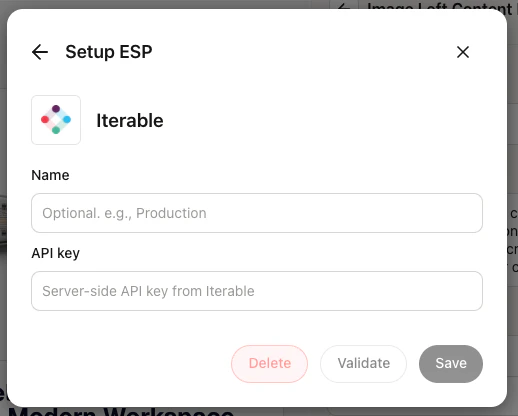 4. Click **Validate** to verify your API key works, then click **Save**.
You can add multiple Iterable configurations if you work with different Iterable projects.
## Push an email to Iterable
1. Open the project you want to push and click **Share**.
2. Under **Integrations**, select **Export to Iterable** (this option appears once you've saved at least one Iterable configuration).
3. Enter a **Template name** — this is the name that will appear in Iterable's Templates section.
4. Click **Export**.
Denada renders your email to HTML and uploads it to Iterable using the [upsert API](https://api.iterable.com/api/docs#templates_upsertEmailTemplate). If an Iterable template with the same name already exists, you'll be asked to confirm whether you want to overwrite it.
## How it works
When you push an email:
* Denada renders the final HTML from your project and its current parameter values.
* Any curly braces (`{` and `}`) in your HTML are escaped so Iterable doesn't interpret them as Handlebars merge tags. If you need Iterable merge tags, add them in Iterable after export.
* The email is upserted in Iterable — if an Iterable template with the same name exists, it is updated in place; otherwise a new one is created. Re-exporting with the same name always updates the same Iterable template.
* The email **subject line** from your project is included in the export.
## Troubleshooting
Make sure you're using a **server-side** API key from Iterable, not a standard or mobile key. You can find this under **Settings > API keys** in your Iterable project.
Your API key may not have the required permissions. Ensure the key has access to create and update email templates in Iterable.
If an Iterable template with the same name already exists, Denada will ask if you'd like to overwrite it. Choose a different name if you want to keep both versions.
For general information about how integrations work, see [Integrations overview](/integrations/integrations-overview).
## Need help?
If you run into issues with the Iterable integration, reach out to [support@heydenada.com](mailto:support@heydenada.com) or ask in our [Community Slack](https://join.slack.com/t/denadacommunity/shared_invite/zt-33ermqnvl-kU9677V0eloK5Jf2SSNO5g).
4. Click **Validate** to verify your API key works, then click **Save**.
You can add multiple Iterable configurations if you work with different Iterable projects.
## Push an email to Iterable
1. Open the project you want to push and click **Share**.
2. Under **Integrations**, select **Export to Iterable** (this option appears once you've saved at least one Iterable configuration).
3. Enter a **Template name** — this is the name that will appear in Iterable's Templates section.
4. Click **Export**.
Denada renders your email to HTML and uploads it to Iterable using the [upsert API](https://api.iterable.com/api/docs#templates_upsertEmailTemplate). If an Iterable template with the same name already exists, you'll be asked to confirm whether you want to overwrite it.
## How it works
When you push an email:
* Denada renders the final HTML from your project and its current parameter values.
* Any curly braces (`{` and `}`) in your HTML are escaped so Iterable doesn't interpret them as Handlebars merge tags. If you need Iterable merge tags, add them in Iterable after export.
* The email is upserted in Iterable — if an Iterable template with the same name exists, it is updated in place; otherwise a new one is created. Re-exporting with the same name always updates the same Iterable template.
* The email **subject line** from your project is included in the export.
## Troubleshooting
Make sure you're using a **server-side** API key from Iterable, not a standard or mobile key. You can find this under **Settings > API keys** in your Iterable project.
Your API key may not have the required permissions. Ensure the key has access to create and update email templates in Iterable.
If an Iterable template with the same name already exists, Denada will ask if you'd like to overwrite it. Choose a different name if you want to keep both versions.
For general information about how integrations work, see [Integrations overview](/integrations/integrations-overview).
## Need help?
If you run into issues with the Iterable integration, reach out to [support@heydenada.com](mailto:support@heydenada.com) or ask in our [Community Slack](https://join.slack.com/t/denadacommunity/shared_invite/zt-33ermqnvl-kU9677V0eloK5Jf2SSNO5g).