> ## Documentation Index
> Fetch the complete documentation index at: https://help.heydenada.com/llms.txt
> Use this file to discover all available pages before exploring further.
# Variations
> Create multiple versions of a project for personalization, localization, testing, and more
Variations let you create multiple versions of a project within a single project. Instead of duplicating projects and managing them separately, you build one version and then generate as many others as you need — each with its own content, targeting, or structure.
By default, Denada keeps the same layout and structure across variations and just changes the content. Images, links, and non-localizable content are preserved unless your instructions say otherwise. If you want something more different — like a shorter version with fewer blocks, different images, or a completely different layout — just say so in your instructions.
 Variations are available on the Team plan.
## Common use cases
### Persona personalization
Take one campaign and create multiple versions targeted at different audience segments. Each variation can have its own copy, imagery, and tone tailored to a specific persona.
> "Create 3 variations of this email: one for new customers, one for loyal customers, and one for lapsed customers. Adjust the headline, copy, and CTA for each."
### Translations and localization
Create localized versions of a campaign for different regions. Denada can translate the content, swap URL extensions, and adjust headers and footers for each market.
> "Make an EU English version and a Spanish version of this email. Translate all content, change the URLs from .com to .es for the Spanish version, and use the EMEA footer instead of the US footer."
### A/B testing
Build split-test versions of a campaign to test different elements — headlines, hero images, CTAs, or completely different layouts.
> "Make an alternate, more concise version of this email with different blocks for a test."
### Journey and series emails
Start with one email and create the next emails in a sequence. Each variation becomes a step in the journey.
> "This is a welcome email. Create 3 follow-up variations: the first focused on product features, the second on customer stories, and the third on a limited-time offer."
### Dynamic content
Convert a standard email into a dynamic content version with proper scripting and logic for your ESP.
> "Create a dynamic content version of this email with Iterable Handlebars logic to show different hero images based on the user's loyalty tier."
For per-recipient logic *inside* a single email — block variants, conditional rendering, merge fields — see [Personalization & dynamic content](/editor/personalization). Variations are complete parallel deliverables; dynamic content is resolved by your ESP for each recipient.
## Creating variations
1. Open any project in the editor.
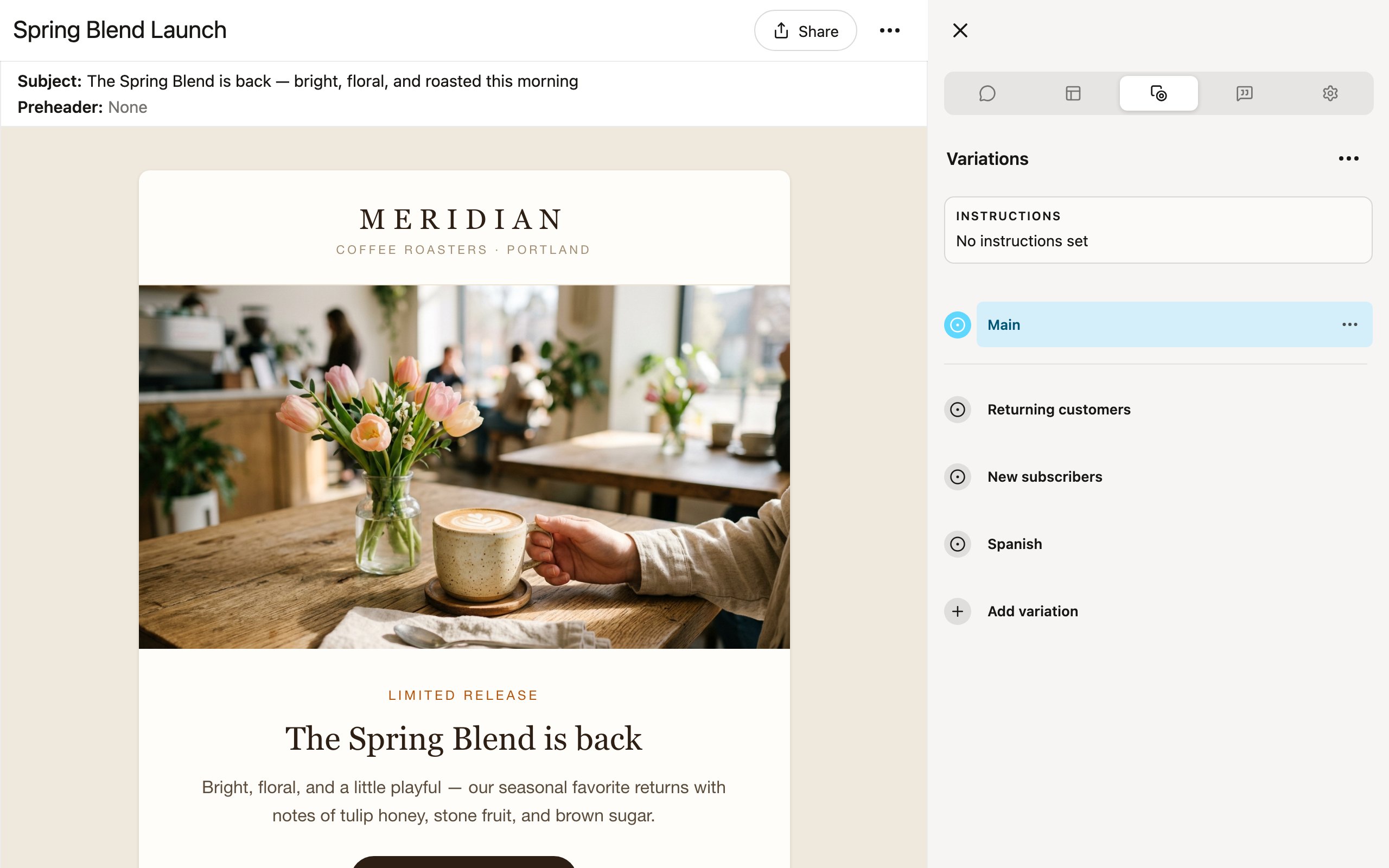
2. Switch to the **Variations** tab in the sidebar (Ctrl+3).
3. Click **Setup** (or, once variations exist, click the **Instructions** cell at the top of the tab).
4. In the **Edit instructions** dialog, describe what you want — the more specific you are, the better the result.
5. Click **Save**.
Denada generates variations based on your instructions. You can generate up to 50 variations per project.
You can also add a single variation by hand: open the **⋯** menu at the top of the Variations tab (or click **Add variation** at the bottom of the list) to open the **New variation** dialog. Give it a name, and either let Denada generate it from instructions (**Generate automatically**) or turn that off to copy content from the main version, another variation, or start blank.
If your variation instructions are detailed — persona definitions, regional requirements, translation guidelines — store them in your team's **Docs** and simply reference them in the instructions field. For example, "Create this for my audience segments" is all you need if your audience segments are already defined in a doc that Denada can read.
## Managing variations
The Variations tab lists the main version first, then every variation. Once generated, you can:
* **View** — click a variation to preview it in the editor.
* **Edit** — switch to the Edit tab while viewing a variation to change its blocks and parameters independently.
* **Reorder** — drag variations by their handles to change their order.
* **Rename** — from a variation's **⋯** menu, choose **Rename**.
* **Edit instructions** — change the instructions for a single variation.
* **Regenerate** — regenerate one variation (**Regenerate**), or every variation at once from the tab's **⋯** menu (**Regenerate all**). Regenerating overwrites any manual edits, and Denada warns you if anyone has modified the variation since the last generation.
* **Delete** — remove one variation (**Delete**), or all of them (**Delete all** in the tab's **⋯** menu).
## Reviewing variations on the web
When you publish a project to the web, reviewers can browse through all variations directly from the shared link. The **Options** menu on the published page lets them switch between variations and preview each one. They can also leave comments on specific variations, so feedback is tied to the right version.
[Learn more about publishing to the web →](/exporting/publish-to-web)
## Exporting variations
You can export variations individually or all at once. In the **Share** menu, toggle **Export all variations** to include every variation in your export.
Available export formats for variations:
* **ZIP** — each variation as a separate HTML file.
* **CSV** — all variations in a spreadsheet with one row per variation and columns for each parameter.
* **Platform export** — push each variation to your connected ESP.
When you export to CSV, you can tell Denada how you want the columns laid out and it will structure them accordingly:
{/* placeholder: screenshot of the resulting CSV opened in a spreadsheet, with one row per variation */}
Export instructions are remembered in your browser so you do not need to re-enter them each time.
## Tips
* **Be specific in your instructions.** "Make 3 versions with different tones" is good. "Make 3 versions" without further direction will mostly just rephrase the same content.
* **Reference the structure.** If you want variations with different blocks or layouts, say so explicitly — otherwise Denada keeps the same structure and just changes the content.
* **Name your variations.** Clear names like "US English," "Spain - Spanish," and "Germany - German" make it easy to find and export the right version.
* **Review before exporting.** Variations are AI-generated starting points. A quick human review ensures everything aligns with your brand and messaging goals.
[Learn more about export formats →](/exporting/export-formats)
Variations are available on the Team plan.
## Common use cases
### Persona personalization
Take one campaign and create multiple versions targeted at different audience segments. Each variation can have its own copy, imagery, and tone tailored to a specific persona.
> "Create 3 variations of this email: one for new customers, one for loyal customers, and one for lapsed customers. Adjust the headline, copy, and CTA for each."
### Translations and localization
Create localized versions of a campaign for different regions. Denada can translate the content, swap URL extensions, and adjust headers and footers for each market.
> "Make an EU English version and a Spanish version of this email. Translate all content, change the URLs from .com to .es for the Spanish version, and use the EMEA footer instead of the US footer."
### A/B testing
Build split-test versions of a campaign to test different elements — headlines, hero images, CTAs, or completely different layouts.
> "Make an alternate, more concise version of this email with different blocks for a test."
### Journey and series emails
Start with one email and create the next emails in a sequence. Each variation becomes a step in the journey.
> "This is a welcome email. Create 3 follow-up variations: the first focused on product features, the second on customer stories, and the third on a limited-time offer."
### Dynamic content
Convert a standard email into a dynamic content version with proper scripting and logic for your ESP.
> "Create a dynamic content version of this email with Iterable Handlebars logic to show different hero images based on the user's loyalty tier."
For per-recipient logic *inside* a single email — block variants, conditional rendering, merge fields — see [Personalization & dynamic content](/editor/personalization). Variations are complete parallel deliverables; dynamic content is resolved by your ESP for each recipient.
## Creating variations
1. Open any project in the editor.
2. Switch to the **Variations** tab in the sidebar (Ctrl+3).
3. Click **Setup** (or, once variations exist, click the **Instructions** cell at the top of the tab).
4. In the **Edit instructions** dialog, describe what you want — the more specific you are, the better the result.
5. Click **Save**.
Denada generates variations based on your instructions. You can generate up to 50 variations per project.
You can also add a single variation by hand: open the **⋯** menu at the top of the Variations tab (or click **Add variation** at the bottom of the list) to open the **New variation** dialog. Give it a name, and either let Denada generate it from instructions (**Generate automatically**) or turn that off to copy content from the main version, another variation, or start blank.
If your variation instructions are detailed — persona definitions, regional requirements, translation guidelines — store them in your team's **Docs** and simply reference them in the instructions field. For example, "Create this for my audience segments" is all you need if your audience segments are already defined in a doc that Denada can read.
## Managing variations
The Variations tab lists the main version first, then every variation. Once generated, you can:
* **View** — click a variation to preview it in the editor.
* **Edit** — switch to the Edit tab while viewing a variation to change its blocks and parameters independently.
* **Reorder** — drag variations by their handles to change their order.
* **Rename** — from a variation's **⋯** menu, choose **Rename**.
* **Edit instructions** — change the instructions for a single variation.
* **Regenerate** — regenerate one variation (**Regenerate**), or every variation at once from the tab's **⋯** menu (**Regenerate all**). Regenerating overwrites any manual edits, and Denada warns you if anyone has modified the variation since the last generation.
* **Delete** — remove one variation (**Delete**), or all of them (**Delete all** in the tab's **⋯** menu).
## Reviewing variations on the web
When you publish a project to the web, reviewers can browse through all variations directly from the shared link. The **Options** menu on the published page lets them switch between variations and preview each one. They can also leave comments on specific variations, so feedback is tied to the right version.
[Learn more about publishing to the web →](/exporting/publish-to-web)
## Exporting variations
You can export variations individually or all at once. In the **Share** menu, toggle **Export all variations** to include every variation in your export.
Available export formats for variations:
* **ZIP** — each variation as a separate HTML file.
* **CSV** — all variations in a spreadsheet with one row per variation and columns for each parameter.
* **Platform export** — push each variation to your connected ESP.
When you export to CSV, you can tell Denada how you want the columns laid out and it will structure them accordingly:
{/* placeholder: screenshot of the resulting CSV opened in a spreadsheet, with one row per variation */}
Export instructions are remembered in your browser so you do not need to re-enter them each time.
## Tips
* **Be specific in your instructions.** "Make 3 versions with different tones" is good. "Make 3 versions" without further direction will mostly just rephrase the same content.
* **Reference the structure.** If you want variations with different blocks or layouts, say so explicitly — otherwise Denada keeps the same structure and just changes the content.
* **Name your variations.** Clear names like "US English," "Spain - Spanish," and "Germany - German" make it easy to find and export the right version.
* **Review before exporting.** Variations are AI-generated starting points. A quick human review ensures everything aligns with your brand and messaging goals.
[Learn more about export formats →](/exporting/export-formats)